
Architecture
Event-Driven Integration
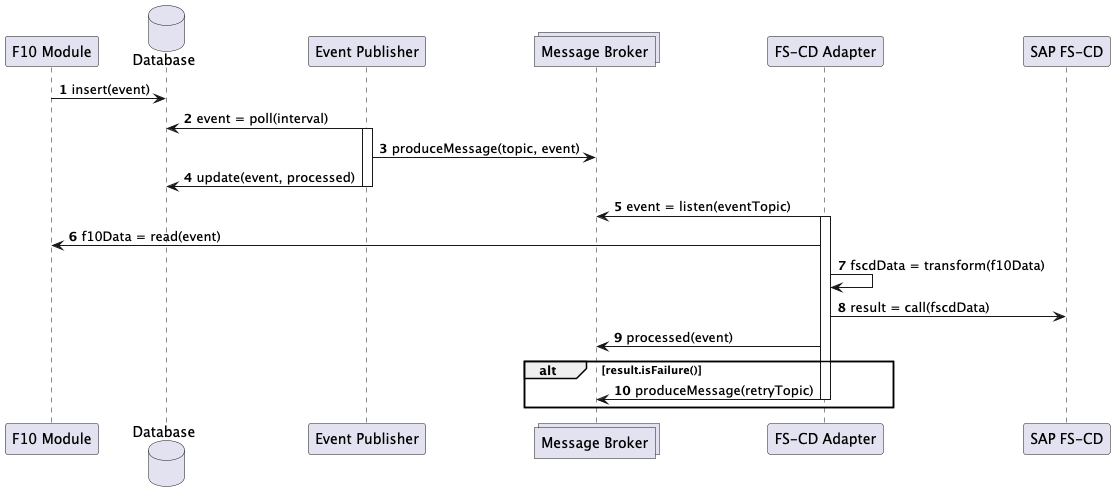
The FS-CD Adapter integration layer implements an event-driven pattern to transfer financial data from the Faktor Zehn Suite to SAP FS-CD.
This layer assumes Faktor Zehn systems (IPM, ICS, ICO) use the Transactional Outbox pattern to reliably publish domain events. For details, see the Faktor Zehn Transactional Outbox documentation.
The following sequence diagram illustrates the complete flow from an insurance system (e.g., IPM) to SAP FS-CD:
Flow Steps:
-
Event Creation: A business process completes in an insurance system (e.g., policy editing finished in IPM), creating a domain event that is inserted into the database in the same transaction as the business data changes.
-
Outbox Polling: A separate process periodically polls the outbox table for new events to process.
-
Event Publishing: For each event, a message is published to a Kafka topic.
-
Event Status Update: The event’s status is updated as processed in the outbox table.
-
Event Consumption: The FS-CD Adapter listens to the Kafka topic and receives the message.
-
Data Loading: The FS-CD Adapter loads required data from the insurance system via REST API. Events typically contain only key identifiers, so the actual data must be fetched.
-
Data Transformation: The FS-CD Adapter transforms the insurance domain data into the FS-CD Adapter’s domain model.
-
SAP FS-CD Call: The FS-CD Adapter calls SAP FS-CD via RFC (Remote Function Call) using SAP Java Connector (JCo) to create or update insurance objects and postings.
-
Message Acknowledgment: After successful processing, the message is marked as consumed.
-
Error Handling: If processing fails, the message is forwarded to a retry topic (transient errors) or dead-letter topic (persistent errors) for analysis.